Vial label template (Avery 5160)
Printable sheets of 30 vial labels sized for Avery 5160 / 8160 (2-5/8" × 1", US Letter): type each vial's numbers online or print blank and write by hand. $4 for the Vial Label Pack.
Buy the Vial Label Pack · $4Get the Bundle · $7
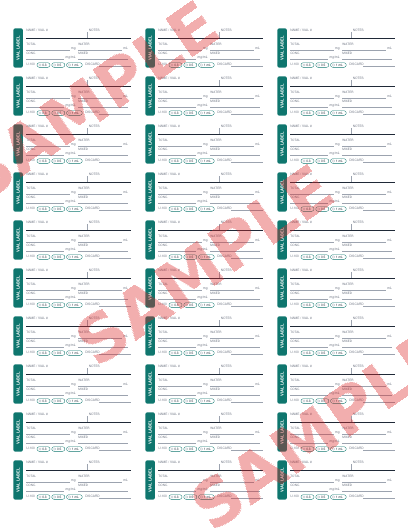
What's on each label
Every label has the same blank fields: name or vial number, a short notes line, total amount in the vial (mg), water added (mL), concentration (mg/mL), the date you mixed it, U-100 syringe size (0.3, 0.5 or 1 mL) and a discard date taken from your product documentation. Nothing is pre-filled. There are no compound names and no suggested amounts, because the right numbers are the ones on your own vial and from your prescriber.
Concentration is simple division: concentration (mg/mL) = vial total (mg) ÷ water added (mL). For example, 10 mg in 2 mL is 5 mg/mL. If you're unsure, run the numbers in the free calculator first and copy the result onto the label.
How to print it so it lines up
- Open the PDF in Adobe Reader, Chrome or Preview. Don't print from a phone screenshot.
- In the print dialog choose Actual size / 100%. "Fit to page" shrinks the grid and the labels drift off the stickers.
- Set margins to None (or Default if None isn't offered; the file already includes the 0.5" sheet margin).
- Print one copy on plain paper, hold it behind an Avery 5160 sheet against a window and check that the boxes sit inside the die-cut labels.
- Load the label sheet with the correct side up (try a marked plain sheet first if you're unsure which way your printer feeds) and print.
Laser printers use Avery 5160; inkjets use 8160 (same layout). Black-and-white printing is fine. Write with a fine-tip permanent pen so the ink doesn't smear on the vial, and let it dry before handling.
Tips for small vials
A 2-5/8" label wraps most of the way around a typical 3 mL or 10 mL vial. If it overlaps, trim the right edge with scissors before peeling. Re-label whenever the concentration changes, such as a new vial or a different water volume, so the numbers on the glass always match what's inside.
What's in the Vial Label Pack
The pack is a PDF with a printing guide and two full sheets (60 labels) with fillable fields, plus access to the online vial label maker, where you type each vial's numbers once, set how many copies you need and which position to start at on a partly used sheet, then print a perfectly aligned Avery 5160 page. The Bundle includes the pack plus the Dose Log and syringe units chart.
Buy the Vial Label Pack · $4Get the Bundle · $7 Compare printables
Math only, not medical advice. These printables don't provide dosing guidance. Confirm every dose with your prescriber or pharmacist.
More printables: Vial label maker · Injection log sheet · Syringe units chart (PDF) · Terms